
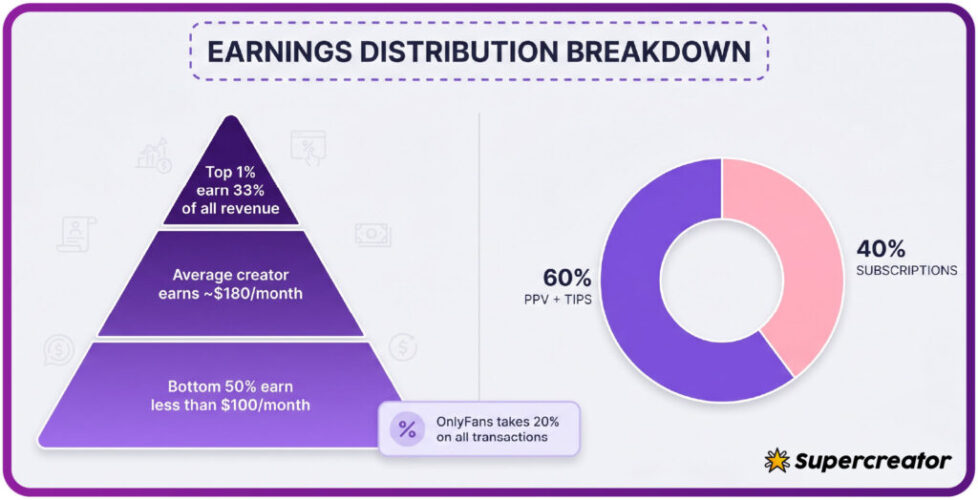
New subscribers to OnlyFans often ask a simple question: when should I tip, and how much? The answer depends on whether you follow a free page supported by pay-per-view messages or a paid page with a fixed monthly price. This article explains how tipping norms differ from pay-per-view expectations so new subscribers can decide when and how much to tip without pressure.

Tipping is voluntary on both free and paid pages. Pay-per-view (PPV) messages and subscription renewals are separate charge types with different rules. Understanding those differences helps you budget and avoids awkward moments.
Free pages set their price to $0 and earn through pay-per-view messages and tips. Paid subscriptions range from $4.99 (minimum) to $49.99 (maximum), though typical paid pages sit between $4.99 and $15, with averages around $5–$10. There is no base price below $4.99; only promotional first months may dip below that floor.
When tips are common
Tipping is most common when a subscriber wants to signal appreciation for specific content or effort. On free pages, tips often serve as the main way to support a creator directly. On paid pages, tips are less frequent but still accepted for extra requests or milestone celebrations.
Creators rarely expect tips for basic posting. The platform fee is 20% on everything — subscriptions, tips, and PPV — so the creator keeps 80%. A ranking service like BestOnlyFans compares public profile prices, promotions, activity, and media counts, but it does not track how much any individual subscriber tips.
Typical situations where a tip feels natural include:
- After a creator fulfills a custom request you made in a message.
- When you want to thank someone for a long-running free page you enjoy.
- During a live stream or special event announced in advance.
- If you ask a question that requires significant time to answer.
- When you renew a subscription and want to add a small extra amount.

Tips versus PPV pressure
PPV messages can feel mandatory because they arrive as direct offers with a price attached. Tips are different: they are always optional and never required to keep access. A creator may send many PPV messages, but you can ignore every one without losing your subscription.
The table below shows signals that separate a reasonable expectation from a pushy one.
| Signal | Good example | Poor example |
| Message tone | “Tip if you enjoyed this — no worries either way.” | “You need to tip or I’ll stop posting.” |
| Frequency | One PPV offer per week. | Five PPV offers in a single day. |
| Price clarity | Price shown before you unlock. | Price hidden until after you reply. |
| Renewal link | Tip option separate from renewal. | Renewal combined with a tip demand. |
| Response to refusal | Creator accepts a polite no. | Creator sends repeated follow-ups. |
When a creator raises the subscription price, auto-renew stops; existing access lasts until the current paid period ends. That rule applies to subscriptions, not tips. A tip never changes your renewal status.
Practical tip: Before you tip, check whether the creator has a free page or a paid page. On free pages, tips often replace subscription income, so they carry more weight. On paid pages, your subscription already supports the creator — a tip is a bonus, not a requirement.

Comparing charge types
Your bank statement will show tips, PPV unlocks, and subscription fees as separate line items. Knowing how each appears helps you track spending and spot errors. The table below summarizes the differences.
| Charge type | When it appears | Statement label | Refundable? |
| Tip | Any time you choose to send one. | Usually “OnlyFans” plus a reference number. | No, tips are final. |
| PPV unlock | After you agree to a paid message. | Same “OnlyFans” label, different reference. | No, once unlocked. |
| Subscription | On your renewal date each month. | “OnlyFans” with a recurring marker. | No, but you can cancel future renewals. |
Because OnlyFans has no built-in discovery feed or directory, ranking sites exist to help subscribers compare pages. BestOnlyFans is one such service that lists public profile prices, promotions, activity levels, and media counts so you can decide which pages match your budget.
That lack of a discovery feed also means you will not stumble onto a page by accident. You find pages through external links, social media, or ranking sites. As a result, your tipping decisions are always deliberate, not impulsive.

Setting your own limits
A tip ceiling is a maximum amount you allow yourself to send in a month. Set it before you browse, not after you see a tempting PPV offer. Write the number down and treat it like any other entertainment expense. A practical starting point is best only fans spending guide, which lists pages by the signals above.
Start by listing your fixed costs. Then subtract those from your monthly entertainment budget. The remainder is what you can safely allocate to subscriptions, tips, and PPV unlocks combined.
Costs to expect month by month:
- Subscription fees: $4.99 to $49.99 per page, but typically $5–$10.
- Promotional first months: sometimes below $4.99, then returning to the normal price.
- PPV unlocks: variable, set by the creator per message.
- Tips: entirely up to you, with no minimum.
- Renewal changes: auto-renew stops if a creator raises the price.
If you follow more than three paid pages, your combined subscription cost can exceed a single tip budget. Review your list every month. Remove pages you rarely open, and redirect that money toward tips on pages you actually enjoy.

Signals of pressure
Pressure can be subtle. A creator might frame a tip as a way to “support the page” while implying that non-tippers get less attention. That framing is a signal, not a rule. You are never obligated to tip.
Watch for these phrases or patterns:
- “Only real fans tip.”
- “I’ll send more content if you tip first.”
- Repeated PPV messages after you decline once.
- Countdown timers that reset every day.
- Guilt-based language about the creator’s expenses.
If you see two or more of these patterns, pause. Re-read the page description and check whether the creator offers a free page or a paid one. Then decide whether the page still fits your budget and comfort level.

Recording what you send
Simple tracking separates tips from PPV unlocks and subscription fees. Use a notes app or a spreadsheet with three columns: date, type, and amount. Update it the same day you send money.
This habit takes less than a minute per entry. It also helps you spot duplicate charges or forgotten renewals. If a charge looks wrong, you can compare your log against your bank statement before contacting support.
Mistakes to avoid:
- Relying on memory instead of a written log.
- Mixing tips and PPV in the same column.
- Forgetting to note promotional first-month prices.
- Ignoring auto-renew dates after a price change.
- Tracking only subscriptions and not tips.
A ranking service like the one described by BestOnlyFans can help you compare public prices and activity, but it cannot see your personal spending. Your own log remains the only accurate record of what you send.
An encrypted HTTPS connection protects the card details sent to a checkout page.
Etiquette recap
Good tipping etiquette comes down to three ideas: tips are optional, PPV is separate, and your budget comes first. You can enjoy a free page without ever tipping, and you can follow a paid page without sending extra money.
If you want a deeper breakdown of spending norms, see this best only fans spending guide for a broader view of how subscribers plan their monthly costs. It covers subscription tiers, promotional periods, and common billing questions.
Takeaways for first-time tippers:
- Tip only when you genuinely want to, never because a message pressures you.
- Keep tips separate from PPV unlocks in your budget.
- Remember the platform fee is 20%, so the creator keeps 80% of every tip.
- Set a monthly ceiling before you browse, and review it each month.
- Use a written log to track every charge type.
- Check public profile details on ranking sites before subscribing.
None of these steps require special tools. A notes app, a monthly reminder, and a clear ceiling are enough. With those in place, tipping becomes a simple choice rather than a source of stress.
FAQ
Do I have to tip on a free OnlyFans page?
No. Tips are always optional. Free pages earn through pay-per-view messages and tips, but you can view public posts without sending either.
Is a tip the same as a PPV unlock?
No. A tip is a voluntary payment with no content attached. A PPV unlock is a payment for a specific message the creator sent you.
What happens if a creator raises the subscription price?
Auto-renew stops, and your existing access lasts until the current paid period ends. You can choose to resubscribe at the new price or not.
Can I get a refund on a tip?
Generally no. Tips are final once sent. If you believe a charge is an error, contact the platform’s support team with your payment details.